

2D Barcode Traceability in North America and Europe: How Industrial Teams Can Improve Asset Data Quality Before 2027
Across North America and Europe, identification is becoming more than a way to put a name or number on a product. Codes increasingly connect physical items to digital records, maintenance instructions, inventory systems, service histories, and compliance information. Recent discussion around retail 2D barcodes is one visible signal of this broader shift. In an October 27, 2026 report, “Packaging World described the GS1 US Sunrise 2027 initiative, which aims for retailers to be able to scan 2D barcodes at checkout by the end of 2027. The retail program does not automatically apply to every industrial asset, but it highlights a practical lesson for infrastructure operators: codes must be readable, data must be governed, and the physical label must remain usable in its real environment. For enterprise teams, the opportunity is to treat labeling as part of a traceability workflow—not as an isolated printing task.
Why 2D barcode traceability is becoming a cross-industry priority
A barcode or QR code is useful only when it reliably connects a physical object with the right digital record. In industrial operations, that record may include an asset ID, location, maintenance schedule, work order, inspection history, configuration, or ownership information.
This matters in environments where equipment is distributed across multiple buildings, field sites, contractors, or countries. A label that is visually clear but linked to an outdated record can still create operational risk. Likewise, a correct record is difficult to use if the label is damaged, obscured, incorrectly placed, or too small for the intended scanner.
What the latest 2D barcode developments do—and do not—mean
On October 27, 2026, “Packaging World” reported on the GS1 US Sunrise 2027 initiative, under which retailers are preparing to scan 2D barcodes at checkout by the end of 2027. The article also notes that packaging may need to accommodate multiple codes for retail scanning, digital information, authentication, and lot or batch identification.
This is a retail-facing initiative, not a universal mandate for industrial equipment labels. Still, it reinforces three lessons relevant to enterprise identification:
- Plan for multiple data needs. A code should have a defined purpose and a clear relationship to the underlying record.
- Protect scan reliability. Code size, contrast, quiet zones, surface condition, placement, and the scanning device all affect performance.
- Avoid code proliferation without governance.Several codes placed on one item can create confusion unless ownership, priority, and destination are defined.
For teams operating across the United States, Canada, France, Spain, Italy, and other European markets, the practical goal is not to add a QR code everywhere. It is to select the right identifier for the workflow and maintain consistency across sites.
From a printed code to a dependable asset workflow
A successful traceability system connects label design, data ownership, physical deployment, and ongoing maintenance. These workstreams should be planned together.
1. Define the record before designing the label
Before selecting a barcode format, establish what the code must resolve to. For a network cabinet, that could be a cabinet ID and location record. For a control panel, it may be an equipment identifier connected to electrical drawings and maintenance history. For a field asset, the code may open a service record or inspection checklist.
Decide who creates the identifier, who maintains the record, what happens when equipment moves, and how retired assets are handled. A stable ID is usually more useful than encoding a long block of information that becomes outdated. Where appropriate, the code can point to a managed digital record rather than attempting to store every detail in the symbol itself.
2. Match the code to the scanning workflow
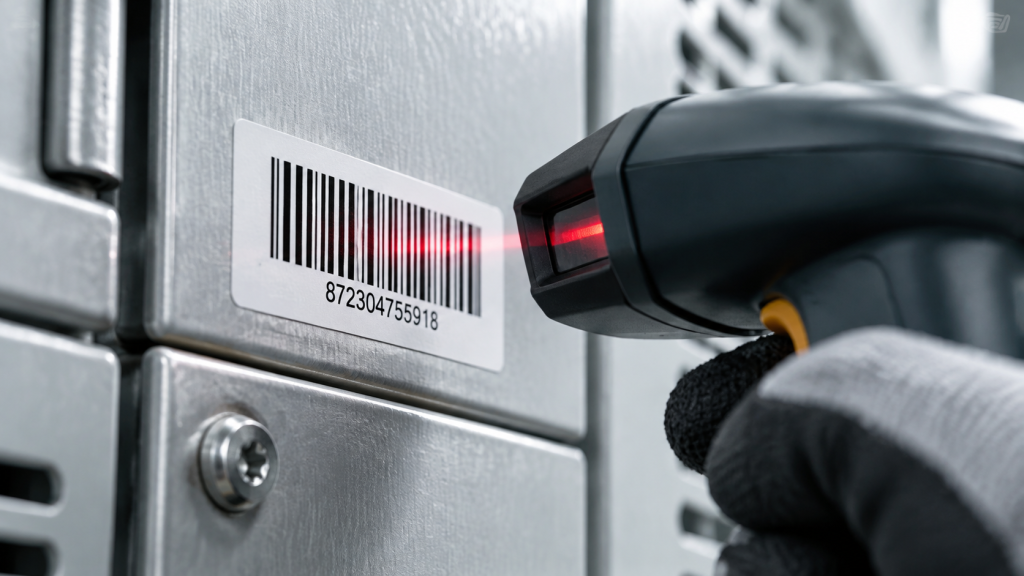
A code that works on a large asset plate may fail on a narrow cable, curved surface, small component, or label viewed at an angle. Test the actual combination of code size, label material, printing method, surface, lighting, and scanner.
For 2D symbols, preserve the required quiet zone and avoid stretching or compressing the artwork. Do not assume that a code that looks sharp on a computer screen will scan reliably after printing and application. Verify the printed result with the devices and software that field staff will use.
3. Choose the material for the real environment
A label for an indoor office asset has different requirements from one attached to a cable, a metal cabinet, or equipment exposed to cleaning, abrasion, moisture, heat, or outdoor conditions. Selection should consider the substrate, surface texture, expected service life, exposure, and whether the label will be touched or handled frequently.
Avoid relying on generic claims such as “industrial grade” without checking the specific material’s technical documentation. Adhesion, print contrast, abrasion resistance, and temperature performance depend on the particular label construction and conditions. Where failure would have safety, compliance, or high replacement costs, validate candidate materials under representative conditions before standardizing them.
The supply-chain implication: standardize the system, not just the label
Multi-site organizations often inherit a patchwork of identifiers, label dimensions, naming rules, and maintenance practices. Different teams may use different abbreviations for the same equipment type, or create labels without a consistent link to the asset database. The result is inconsistent search, duplicate records, and time lost during maintenance.
A stronger program defines a small set of approved label formats and naming conventions for each use case. It also identifies which fields are mandatory, how labels are approved, and how replacements are ordered. For distributors and engineering partners, this creates an opportunity to support customers with application mapping, sample testing, approved consumable lists, and repeatable deployment procedures—not simply one-off hardware sales.
Build an application matrix
A practical matrix should record:
- Asset or component type
- Required identifier and code format
- Label dimensions and placement
- Surface and operating environment
- Approved material and compatible printer
- Scanner or mobile device used for verification
- Record owner and replacement process
This approach helps procurement teams compare options on total workflow fit rather than printer price alone. It also makes it easier to roll out consistent identification across a headquarters, regional facilities, field teams, and contracted service providers.
Measure operational outcomes
Set a baseline before a rollout. Useful indicators can include first-scan success, time required to identify an asset, percentage of records with complete mandatory fields, duplicate identifier rate, label replacement frequency, and time spent correcting field data. These measures help teams determine whether a new labeling process is improving operations.
Do not treat a single pilot as proof that every site will achieve the same result. Different surfaces, lighting, scanner models, user training, and data quality can change performance. Use pilot findings to refine the standard before expanding.
How MakeID fits into an industrial identification program
MakeID’s redesigned B2B website positions the company around industrial identification, field verification, and smart access solutions, with application focus areas including telecommunications, data centers, power and utilities, and industrial electrical environments. The appropriate hardware depends on label size, work location, label format, and whether the work is performed in the field or at a fixed workstation.
M100C for field and cable identification
The M100C is a rugged 1-inch, 300 dpi portable model designed for field identification. Its listed specifications include a maximum print width of 25.4 mm, a 2600 mAh battery, 1.5 m drop resistance, Bluetooth and USB-C connectivity, and a manual cutter. It is relevant where technicians need compact identification for cables, wires, and compatible label formats such as self-laminating or flag labels. For heat-shrink tubing, verify the exact compatible consumable and dimensions before specifying it in a project.
M200D for mobile equipment and asset workflows
The M200D is positioned as a lightweight 2-inch portable printer for equipment and asset identification. It may be a candidate for teams that need wider labels than a 1-inch device can accommodate while working across different assets or locations. Confirm the current product-page specifications, supported label formats, and compatible consumables against the intended application before writing them into a procurement standard.
M200E for repeated equipment and facility labeling
The M200E is a rugged 2-inch, 300 dpi model with an automatic cutter and support for continuous, gap, and black-mark label types. It can be evaluated for repeated asset and facility labeling where consistent output and automatic cutting are useful. Its listed drop resistance is 0.6 m; it has no display. Match the label format and material to the target surface and operating environment.
M400B for wide-format identification
The M400B is a portable wide-format model with a maximum print width of 105.6 mm and 300 dpi resolution. It is designed for wider equipment and facility labels, safety information layouts, and cable hang tags used in telecom, data center, and infrastructure work. Its listed workflow uses manual tear-off rather than an automatic cutter. Wide formats can provide more room for readable text and a code, but the code still needs to be sized and verified for the intended scanner.
No printer alone guarantees traceability. The outcome depends on the code design, compatible consumable, data quality, scanning process, and maintenance ownership. MakeID customers and channel partners should validate the full workflow with representative labels and scanners before broad deployment.