
How to Manage 10,000+ Asset Labels in 50% Less Time?
Handling label data for 10,000+ assets can be daunting: duplicate IDs, inconsistent formats, disconnected physical items from data collected online, manual updates taking too much time… These issues lead to inventory errors, compliance risks and delayed maintenance. The solution? Quickly integrate standardized asset labels from reliable label printers like MakeID’s models with streamlined workflows – these solutions turn chaos into order helping save both time and mistakes!

Why Efficient Asset Labeling is Crucial for Large-Scale Operations?
The value of asset labels for the business world cannot be understated. If you’re involved engaged in manufacturing, warehouse, or any other field which handles large quantities of goods asset labels form an essential element of efficient monitoring and control. They help businesses:
- It is easy to track assets and find them
- Make sure you have an updated inventory system
- Make sure that maintenance plans are observed
- Be sure to follow the regulations.
If you don’t have a standardized labeling method, you could be prone to mistakes that can lead to delays, inefficiencies as well as increased expenses. If your assets grow to more than 10,000 items, the manual management of them becomes impossible and demonstrates the necessity for an organized and efficient solution.
Challenges of Managing Asset Labels for 10,000+ Assets
Handling large volumes of assets comes with its own set of challenges. The A few of the most frequently encountered problems are:
- Inconsistent Labeling: If there is no standardized system for labeling, labels may be inconsistent, which makes it hard to find assets in a short time.
- Data entry errors: Data entry errors that are manually entered or scanning barcodes could result in errors with the identification of assets.
- Time Consuming Processes: Manually labeling and tagging assets requires some time and can be used to focus on other tasks that are crucial.
- Missing and lost assets: If assets aren’t tracked appropriately, they are likely to get lost and cause unneeded replacement costs.
In order to overcome these obstacles you must implement an organized approach.
3 Steps to Streamline 10,000+ Asset Labels Management
Step 1: Standardize Asset Label Data – Lay the Foundation
Effective management begins with consistency of and reliable data. For assets with more than 10,000 create core fields in order to prevent chaos
- Must-have: Unique Asset ID (e.g., MID-XXXX-YYYY), Asset Type (IT equipment/industrial machinery/tools), Purchase Date, Location (Zone-Rack-Shelf), Maintenance Cycle, Responsible Person.
- Optional: Warranty period, serial number, Compliance Certifications (for regulated industries).
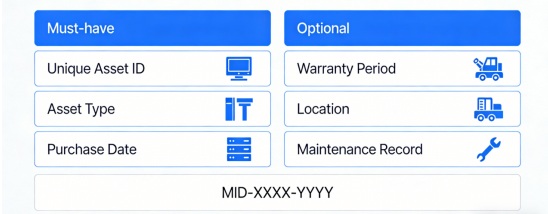
Be sure to follow the formatting rules: Use uppercase letters plus numbers as identification numbers (no particular characters) and then save the data into an centralized spreadsheet (Excel) or an asset administration program (SAP/IBM Maximo) for editing in bulk. Clear data first. Remove duplicates. correct typos and make use of drop-down menus to select the type of asset to ensure that errors are not made.
Step 2: Choose the Right Asset Labels & Label Printers
1. Asset Labels Selection by Scenario
| Asset Scenario | Recommended Asset Labels | Key Features |
| Industrial machinery/Outdoor assets | Durable synthetic labels (PET/PP) | Wear-resistant, waterproof, -40℃~150℃ temperature tolerance |
| IT equipment/Data centers | Self-laminating labels | Scratch-resistant, clear barcode/QR code printing |
| High-volume small assets (tools/parts) | Flag labels | High visibility, easy to distinguish in dense storage environments |
2. MakeID Printer Matching for High-Volume Needs
| Application Scenario | Recommended MakeID Printer | Core Advantages |
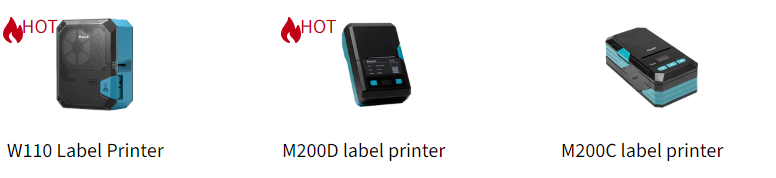
| Prefabrication of bulk (factory/warehouse) | MakeID M200D Industrial Label Printer | 300DPI, Wide format 48mm; Batch import via Excel/CSV batteries 2600mAh. |
| Maintenance on-site (logistics containers Dynamic assets) | MakeID W110 Handheld Label Printer | 580g; Bluetooth/WiFi/USB. 5s cartridge refill One-touch cutter (easy to use on-site). |
| Electronic asset labeling for cables (IT/data centers) | MakeID M200C Bluetooth Label Printer | 300DPI precision; optional UHF RFID; flag/T-shaped label compatibility; cross-platform sync. |
All MakeID printers allow Excel/CSV imports that allow batch creation from thousands of labels for asset, without manually entering data, which can save hours of repetitive work.
Step 3: Streamline Workflows – Integrate Data, Labels & Printers
1. Bulk Label Generation
Export the standardized data from your centralized system (Excel/CSV) to upload it to MakeID’s printing software The printer will automatically create uniform labels. The M200D’s wide-format capability and continuous printing support handle 10,000+ label batches efficiently, ensuring uniform quality for factory/warehouse assets.
2. On-Site Data Sync
For dynamic assets (e.g., logistics containers, mobile equipment) requiring on-site updates, use the W110 handheld printer: Edit data via the mobile app with 48 built-in templates, print immediately, and link labels to your asset system via QR codes for instant data access. The M200C’s RFID function further enhances intelligent tracking by enabling on-site encoding and printing in one step.
3. Quality Control
Prior to full-scale production, and following on-site updates, quality assurance assures accuracy of data and durability of the label. Print small batches of test prints to test the accuracy of data and adhesion to the label. Make a series of checks at every 500 labels in bulk printing to avoid mistakes. On-site labels should be checked to ensure the QR code scans well and that the text is legible in the intended environment (e.g. outdoors, dust from industrial sources).
Master Asset Label Data Management with the Right Tools
Manage 10,000+ asset labels without stress! The key to cutting your workload time by 50% lies in three key steps: standardizing data, selecting durable asset labels and pairing them with reliable printers like MakeID. Their bulk printing capabilities, on-site flexibility and seamless system integration will eliminate chaos, reduce errors and free up valuable time – perfect whether you’re managing industrial gear, IT equipment or logistics inventory! With MakeID’s “asset labels + printers” solution, designed specifically for high volume efficiency you can access a stress-free asset label management! Import your data today and unleash stress-free asset label management!