How to Create Professional Asset Labels for Equipment, Tools, and IT Assets
Asset identification is an essential part of efficient equipment management. Whether you are managing IT equipment in a data center, tools in a workshop, machinery in a factory, or equipment across multiple facilities, clear and durable asset labels make it easier to identify, track, and maintain physical assets.
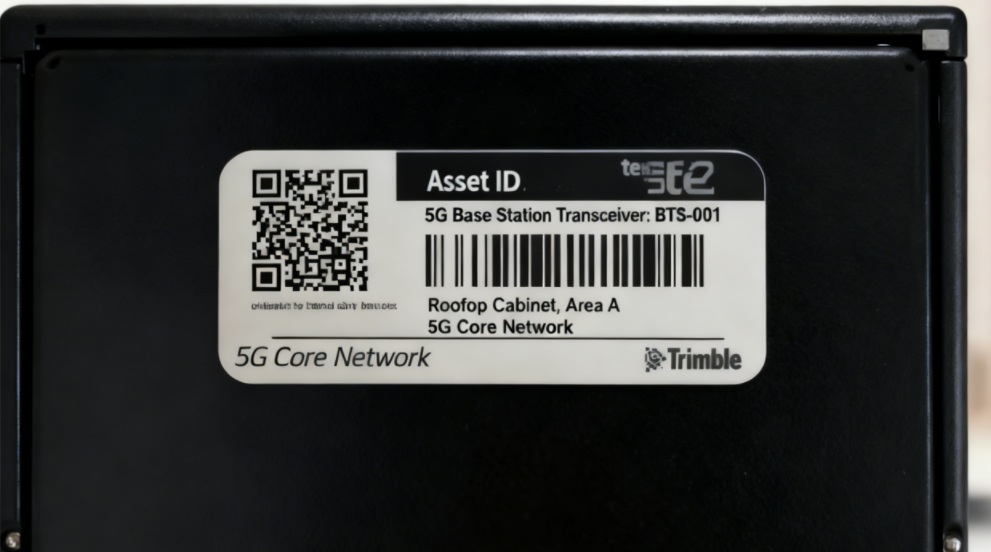
A professional asset label does more than display an asset number. It can combine an ID, barcode or QR code, equipment information, and other details in a compact, easy-to-scan format.
In this guide, we’ll explain what asset labels are, what information they should contain, how to choose the right label material, and how to create professional asset labels with a portable industrial label printer such as the MakeID M200D.
What Are Asset Labels?
Asset labels are identification labels attached to physical assets to help organizations identify, track, and manage equipment throughout its lifecycle.
They are commonly used on:
- IT equipment and servers
- Network switches and cabinets
- Manufacturing machinery
- Power tools and equipment
- Warehouse equipment
- Office equipment
- Electrical equipment
- Batteries and industrial devices
An asset label typically contains a unique identification number and may also include a barcode or QR code. When connected to an asset management system, the code can provide quick access to information such as equipment specifications, maintenance records, location, or warranty information.
The goal is simple: make every physical asset easy to identify and manage.
Why Are Professional Asset Labels Important?
As the number of assets increases, relying on handwritten notes or inconsistent labels can make identification and maintenance more difficult.

A standardized asset labeling system can help organizations:
1. Identify Equipment Faster
A clearly printed asset ID allows employees and technicians to identify equipment without searching through paperwork or databases manually.
2. Improve Asset Tracking
Barcodes and QR codes can connect physical equipment with digital asset records, making it easier to update locations, maintenance information, or ownership details.
3. Reduce Identification Errors
Consistent label formats, readable text, and machine-readable codes help reduce mistakes caused by unclear handwriting or inconsistent naming.
4. Simplify Maintenance
Technicians can quickly identify equipment and access relevant information during inspections, repairs, or routine maintenance.
5. Improve Workplace Organization
Standardized labels create a consistent identification system across workshops, warehouses, server rooms, and industrial facilities.
What Information Should an Asset Label Include?
The information on an asset label depends on the application and available label space. A simple asset label may only require an ID number, while more complex applications may require a barcode or QR code.
Common information includes:
Asset ID
Every asset should have a unique identification number.
For example:
AST-IT-00258
A consistent naming convention makes assets easier to organize and search.
Barcode or QR Code
A barcode or QR code can store more information than a printed asset number while occupying relatively little space.
For example, scanning a QR code could direct a technician to:
- Asset records
- Maintenance history
- Equipment specifications
- Service instructions
- Warranty information
- Location information
Equipment Name
Adding a short equipment name can make the label easier to understand at a glance.
For example:
NETWORK SWITCH
Location or Department
For organizations managing equipment across multiple areas, location information can also be useful.
For example:
Server Room A / Rack 12
Optional Information
Depending on the application, you may also include:
- Serial number
- Purchase date
- Department
- Manufacturer
- Maintenance date
- Contact information
However, avoid putting too much information on a small label. The label should remain easy to read and scan.
How to Choose the Right Asset Label Material
Not every asset is used in the same environment. Choosing the right label material is important for long-term readability and adhesion.
Indoor Equipment
For office equipment, computers, workstations, and other indoor assets, standard synthetic labels may be sufficient.
These labels are suitable when the environment has limited exposure to moisture, chemicals, abrasion, or extreme temperatures.
IT and Data Center Equipment
Servers, switches, cabinets, and workstations often require compact labels with clear text and barcodes or QR codes.
Flat labels are particularly suitable for smooth surfaces such as servers, switches, workstations, and cabinets.
Industrial Equipment
Machinery, tools, batteries, and equipment used in industrial environments may require more durable materials.
For demanding applications, materials such as PET or polypropylene can provide better resistance to environmental exposure and everyday wear.
Tools and Small Equipment
For tools and small assets stored together, highly visible labels can make individual items easier to distinguish.
Flag or hanging labels can be useful when a flat label does not provide enough visibility or surface area.
The key is to match the label material and format to the asset, surface, and working environment.
How to Create Professional Asset Labels
Creating an effective asset label does not need to be complicated. A consistent workflow can help ensure that every label follows the same format.
Step 1: Define Your Asset Identification System
Before printing, determine how assets will be identified.
For example:
- IT equipment: IT-0001
- Tools: TOOL-0001
- Machinery: MACH-0001
- Electrical equipment: ELEC-0001
Use a consistent naming structure throughout your organization.
Step 2: Decide What Information to Print
Determine which information is essential for each asset.
For a small equipment label, you might use:
AST-00258
QR CODE
For a larger asset label:
AST-00258
NETWORK SWITCH
SERVER ROOM A
Avoid unnecessary information that makes the label difficult to read.
Step 3: Select the Label Size
Choose the label width based on the amount of information you need to print.
Small labels work well for compact equipment and tools, while wider labels are more suitable when you need to combine text with barcodes or QR codes.
Step 4: Choose a Durable Material
Consider where the asset will be used.
- Will the label be exposed to water?
- Will it experience abrasion?
- Will it be exposed to oil or chemicals?
- Will it be used outdoors?
- Does the surface have enough space for a flat label?
Choosing the right material at the beginning can help prevent labels from becoming unreadable or needing frequent replacement.
Step 5: Print and Apply the Labels
After creating the label template, print a small test batch first.
Check:
- Text readability
- Barcode or QR code scanning
- Label size
- Adhesion
- Placement
Once the format has been verified, continue with the remaining assets.
Why Choose the MakeID M200D for Asset Labeling?
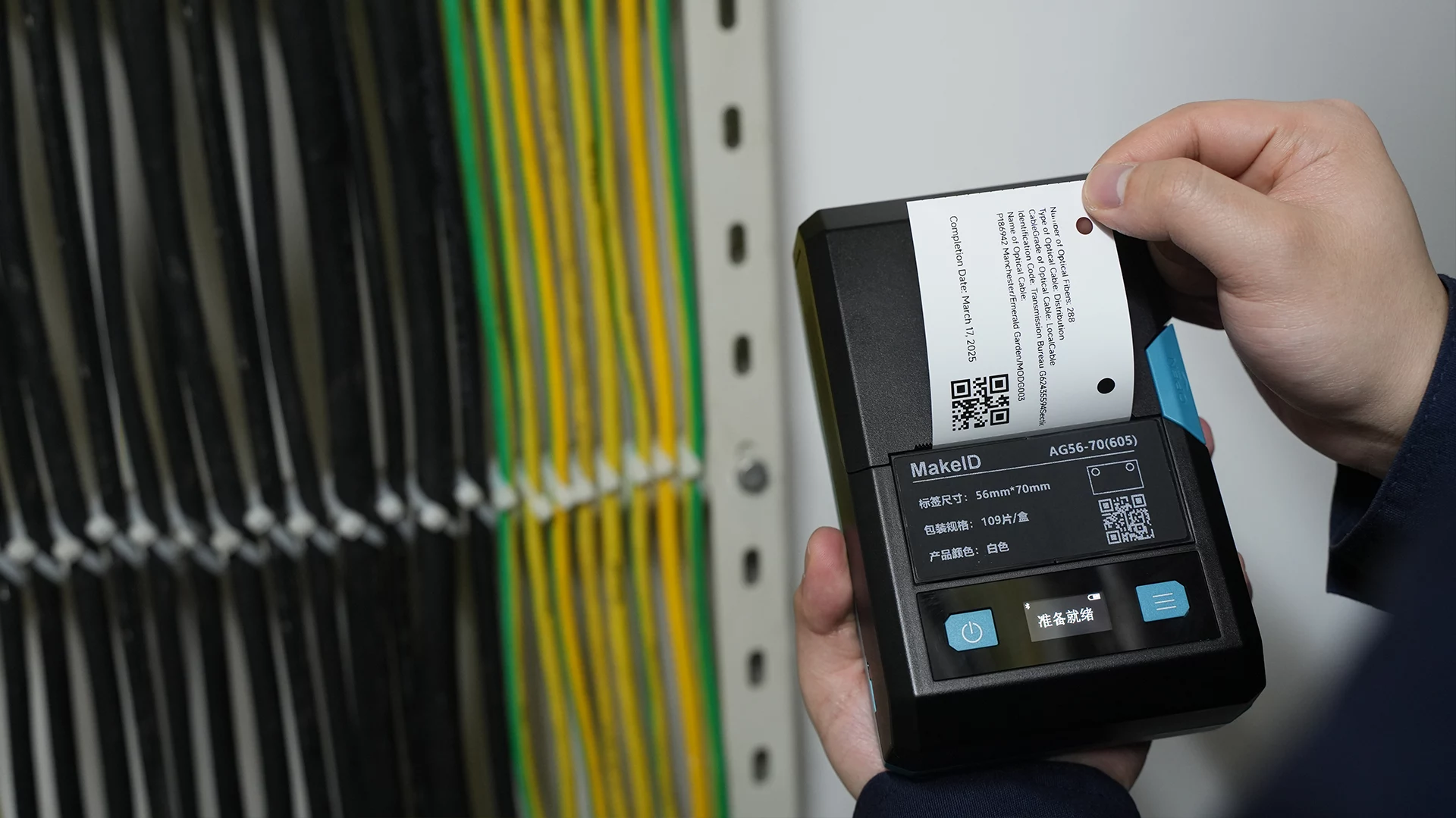
For organizations that need flexible, professional asset labels, the MakeID M200D Industrial Label Printer provides a practical solution.
The M200D supports 300 DPI printing and label widths from 9 to 48 mm, giving you enough space for asset IDs, text, barcodes, and QR codes. Its 460 g lightweight design also makes it easier to move between workstations or use during on-site maintenance.
300 DPI Printing for Clear Asset Identification
The M200D uses 300 DPI printing to produce sharp text, barcodes, and graphics.
This is particularly useful when asset labels contain small text or machine-readable codes.
Up to 48 mm Printing Width
With support for label widths up to 48 mm, the M200D can accommodate a wider range of asset label formats than narrow-format label printers.
A wider label can provide more space for:
- Asset IDs
- QR codes
- Barcodes
- Equipment names
- Location information
Multiple Label Formats for Different Assets
The M200D supports several label formats for different applications.
Flat labels can be used for servers, switches, workstations, and cabinets, while hanging labels can be used for equipment and racks. All-weather PET labels can also be used for applications such as batteries, power tools, and other industrial equipment.
This makes it possible to use one printer for multiple asset identification scenarios.
Portable Design for On-Site Work
The M200D weighs approximately 460 g without consumables and features a 2600mAh rechargeable battery.
For maintenance teams and engineers, this allows labels to be created closer to the equipment instead of requiring technicians to return to a desktop printer.
Cross-Platform Editing
The M200D supports editing across Windows, macOS, Android, and iOS. Its software also supports data synchronization between PC and mobile devices, making it easier to create and manage label designs across different work environments.
Integrated Cartridge Design
The M200D uses an all-in-one cartridge system that integrates the ribbon and label material. The printer can automatically detect label specifications when the cartridge is replaced, helping simplify the printing workflow.
Asset Label Examples by Application
Different assets require different label formats.
| Application | Recommended Label Format | Typical Information |
|---|---|---|
| Servers | Flat label | Asset ID + QR code |
| Network switches | Flat label | Asset ID + device name |
| Server racks | Hanging label | Rack ID + location |
| Power tools | All-weather label | Tool ID + QR code |
| Batteries | All-weather PET label | Battery ID + safety information |
| Warehouse equipment | Flat or hanging label | Asset ID + location |
| Industrial machinery | Durable synthetic label | Machine ID + maintenance information |
The M200D supports flat, hanging, flag, winding, and all-weather label formats, allowing organizations to adapt the label format to different assets and environments.
Asset Labeling Best Practices
A good asset labeling system should be consistent, readable, and easy to maintain.
Use a Consistent Format
Keep the same font, layout, ID structure, and barcode or QR code placement across similar assets.
Keep Asset IDs Unique
Never assign the same asset ID to two different physical assets.
Make Codes Easy to Scan
Leave enough space around barcodes and QR codes and make sure the printed code is large and clear enough for reliable scanning.
Choose Materials Based on the Environment
Indoor office equipment and outdoor industrial machinery have different requirements. Choose label materials accordingly.
Test Before Large-Scale Printing
Print several samples and test them on the actual equipment before producing a large batch.
Keep Physical and Digital Records Connected
An asset label is most useful when its ID or QR code connects the physical asset to an up-to-date digital record.
Build a More Efficient Asset Identification System with M200D
Professional asset labeling starts with more than a good-looking sticker. The most effective system combines a consistent identification structure, the right label material, readable printing, and a workflow that connects physical labels with digital asset information.
For IT equipment, tools, machinery, warehouse equipment, and other assets, the MakeID M200D provides a flexible way to create professional labels in different sizes and formats.
With 300 DPI printing, up to 48 mm printing width, multiple label formats, cross-platform editing, and a lightweight portable design, the M200D is built to support a wide range of asset identification applications.
Frequently Asked Questions
What is an asset label?
An asset label is an identification label attached to physical equipment or property. It commonly includes a unique asset ID and may also contain a barcode or QR code.
What should be included on an asset label?
A basic asset label usually includes a unique asset ID. Depending on the application, you can also include a barcode, QR code, equipment name, location, or maintenance information.
What is the best material for asset labels?
The best material depends on the environment. Indoor equipment may require standard synthetic labels, while industrial equipment, tools, batteries, and outdoor assets may require more durable materials such as PET or polypropylene.
Can asset labels include QR codes?
Yes. QR codes can be included on asset labels to connect physical equipment with digital records, maintenance information, specifications, or other data.
What label printer is best for asset labeling?
A suitable asset label printer should provide clear printing, flexible label widths, durable label materials, and the ability to print barcodes or QR codes. The MakeID M200D supports 300 DPI printing and label widths from 9 to 48 mm, making it suitable for a variety of asset identification applications.
Final Thoughts
A well-designed asset labeling system makes equipment easier to identify, track, maintain, and manage. By combining unique asset IDs, machine-readable codes, durable materials, and consistent label formats, organizations can create a more organized and reliable asset management workflow.
For teams managing IT equipment, industrial machinery, tools, warehouse assets, and other physical equipment, the MakeID M200D offers a flexible solution for creating professional asset labels wherever they are needed.