
How to Choose The Resolution of Portable Label Printer? A Comprehensive Comparison Between 203 DPI and 300 DPI
Have you ever been troubled by the “resolution” parameter when choosing a portable label printer? Should one choose the economical and practical 203 DPI or invest in the clearer 300 DPI? Resolution is not necessarily the higher the better; the key lies in matching your actual usage scenarios. This article will thoroughly break down the differences between the two for you. Through specific comparisons and scenario analyses, it will help you make precise and economical investment decisions, avoiding the embarrassment of “excessive performance” or “insufficient clarity”.
What is DPI? Why is It Crucial For Label Printing?
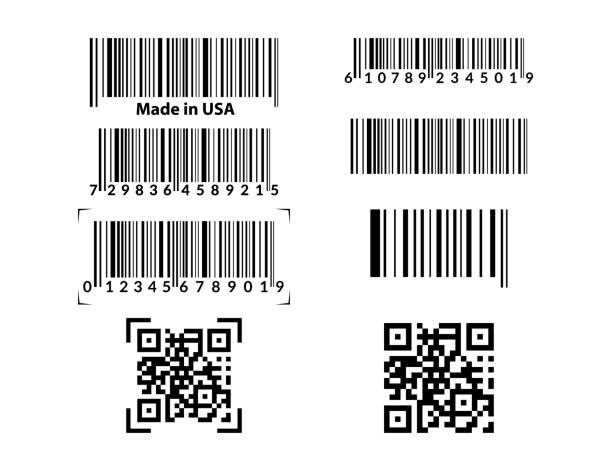
DPI (Dots Per Inch) is the core indicator for measuring printing accuracy. It represents how many independent ink dots or thermal dots a printer can place at a straight-line distance of one inch. The more dots there are, the smaller the gaps between the dots will be, and the smoother the edges and richer the details of the printed text and graphics will be.
In the field of label printing, resolution directly determines:
- Text readability: Especially for small-sized, complex fonts (such as multilingual, thin-line fonts) or character-dense labels.
- Graphic and barcode quality: It directly affects the refinement of the company’s Logo, the fidelity of simple graphics, and especially the scanning success rate of various barcodes (such as one-dimensional codes and two-dimensional codes). Too many “burrs” on the edge of the barcode may make it difficult for the scanning device to recognize.
- Overall professionalism: A clear and sharp label is a direct reflection of the product image and professional management.
But it’s not the case that the higher the DPI, the better
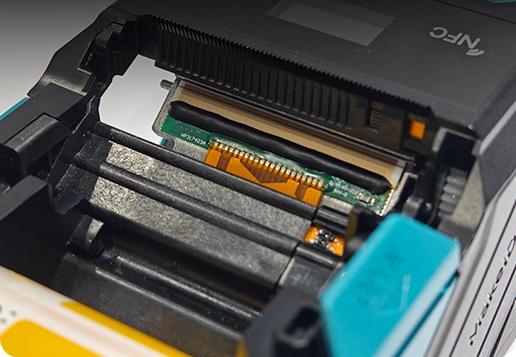
- Although high DPI is more precise, the printing speed may be slightly slower
- High DPI models usually have a higher cost
- In portable devices, a high DPI may slightly increase power consumption
- Therefore, DPI is an indicator that is “selected on demand”, rather than the higher the better.
203 DPI Label Printer Analysis
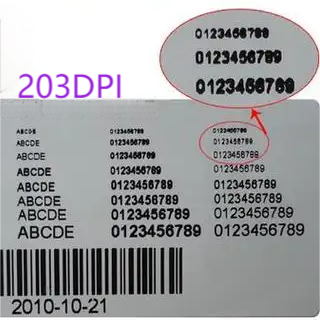
203 dpi is the most common and economical resolution for portable label printers. Its features include:
- The clarity of the text and numbers is sufficient for daily use
- It can accurately print most barcodes (such as Code128, QR Code).
- It prints faster and consumes less power
- The consumables have strong compatibility and low maintenance costs
Applicable scenarios
203 dpi is widely used in the following label types:
- Logistics and warehousing labels
- Transport sticker
- Retail price tag
- Shelf identificationSimple ICONS, ordinary QR codes
Advantages and Limitations
Advantages
- Low cost
- Fast printing speed
- Wide range of applications
- The battery life is better in portable scenarios
Restriction
- Fonts smaller than 6pt are not clear enough
- The edges of the fine ICONS are not sharp enough
- The recognition rate of high-density QR codes is less than 300 dpi
300 DPI label printer analysis
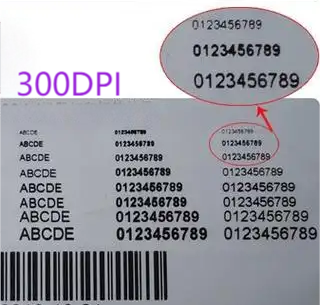
The 300 dpi printer is specifically designed for fine labels and features:
It can clearly present tiny fonts
The ICONS and lines are sharperHigh-density barcodes and electronic product labels have a higher recognition rate
Applicable scenarios
300 dpi is more suitable for labels that require higher professionalism, such as:
- Cable identification, cable labels (in extremely small font)
- Medical labels (medicine bottles, vial tubes)
- Serial number of electronic products, UL markScenarios that require high-density QR codes
Advantages and Limitations
Advantages
- High fineness and professional appearance are even better
- The effect of small fonts and fine lines is excellentThe scanning recognition is more accurate
Restriction
- The equipment cost is higher
- The printing speed is slightly slow
- Higher requirements are placed on the quality of consumables
Comparison of 203 DPI and 300 DPI
| Features | 203 DPI | 300 DPI |
| Dots per inch | 203 dots | 300 dots |
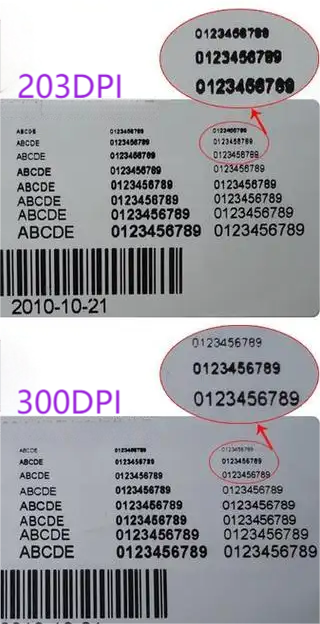
| Print resolution | Standard | Approximately 48% higher |
| Minimum readable font | Approx. 6-8 pt | Can print small fonts of 4-6 points clearly |
| Barcode display | Suitable for standard-sized 1D/2D barcodes | Can print higher density micro barcodes with smoother edges |
| Graphic display | Prints simple graphics with slightly stepped edges | Richer graphic details and smoother transitions |
Visual description differences: When printing the same label containing small text and a QR code, the 203 DPI version may make the strokes of the small text appear slightly jagged, and the edges of the QR code squares appear slightly blurry; while the 300 DPI version has clear and crisp strokes for the text, and the QR code squares are square and distinct.
In-depth Analysis Of Applicable Scenarios
The advantages and applicable scenarios of 203 DPI
Economical and efficient: The cost of printers and consumables is usually lower, and the printing speed is relatively faster.
Scene matching
Internal logistics and warehousing: Outer box transportation labels, shelf positioning labels, pallet labels.
Retail and asset Management: Price tags, underlying asset identification (such as office furniture, large equipment).
Simple content: Labels mainly consisting of large-font text and ordinary barcodes.
Assembly line operations that are cost-sensitive or have a huge print volume.
The advantages and applicable scenarios of 300 DPI
Fine and professional: Provide visual effects close to those of printed materials to enhance brand image.
Scene matching
Electronic products and precision manufacturing: Circuit boards, micro-components, and identification labels for jewelry. Limited space but large amount of information.
Medical and laboratory: Labels on test tubes and sample bags often contain patient information in small font and high-density barcodes.
High-end retail and product identification: Product labels that require the printing of fine logos, complex graphics or small characters with multilingual descriptions.
Demanding automatic recognition environment: Production lines or logistics sorting centers with extremely high requirements for the first scan rate of barcodes.
Trade-off between cost and efficiency
Initial investment: The price of 300 DPI printers is usually higher than that of the 203 DPI version of the same model.
Consumable cost: The consumables (label paper, ribbons) for both are generally interchangeable, but high-resolution printing may be more “picky” about the quality of consumables. Inferior consumables are more likely to expose flaws at 300 DPI.
Printing speed: When printing the same content, 203 DPI printers are usually faster because they need to process fewer data points. This is a significant advantage for internal turnover scenarios that pursue efficiency.
The impact of DPI on the experience in portable label printers
- Outdoor printing: High DPI labels are more readable in strong light
- Battery life: 300 dpi printing usually consumes a little more power
- The printing method affects: Thermal transfer printers perform better at 300 dpi
- Bluetooth Portable mode: High DPI file transfer may be larger, but most devices can handle it easily
Purchase Guide: Which DPI is More Suitable for You?
Daily office work, warehousing, transportation, price tags → 203 dpi
Cable labels, power industry, medical care, electronic manufacturing → 300 dpi
To print the brand Logo and icon → 300 dpi
Pursuing speed and battery life → 203 dpi
High requirements for label appearance → 300 dpi
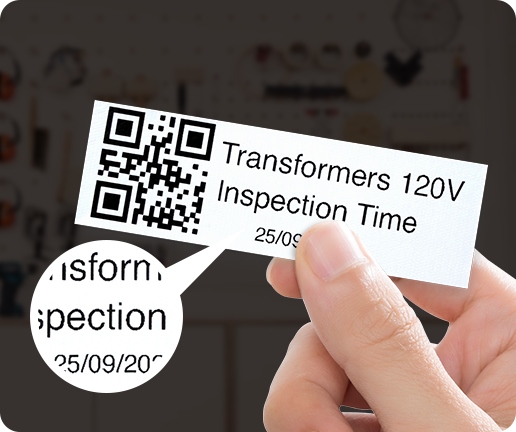
Other Key Factors Affecting The Printing Effect
Printing technology: Thermal transfer (using carbon ribbons) can fully demonstrate its durability and clarity at 300 DPI, making it suitable for long-term use of labels. Thermal (direct imaging) printed labels are prone to fading, and the advantage of high resolution may be lost over time.
Consumable quality: High-quality label paper and matching ribbons are the cornerstones of clear printing. Poor-quality consumables can lead to blurry printing and uneven adhesion of carbon ribbons. No matter how high the resolution is, it won’t help.
Label design software: Professional label software can optimize fonts and graphics to achieve the best display effect at different resolutions. Try to use vector graphics as much as possible to avoid distortion when magnified.
Common FAQ
Is 300 dpi much clearer than 203 dpi?
Yes, especially in terms of small fonts, fine lines and ICONS, there has been a significant improvement.
Will 300 dpi lead to a slower printing speed?
Under normal circumstances, it will be a little slower, but the difference is not significant.
Will DPI affect the durability of labels?
It has no direct impact. Durability is determined by the printing technology (thermal/thermal transfer) and consumables.
Can 203 dpi print QR codes?
Sure, but for high-density QR codes, it is recommended to use 300 dpi.
How can I check how much DPI my portable label printer supports?
Check the product manual, official website specifications or body label.
Conclusion
Choosing between 203 DPI and 300 DPI is essentially about finding the balance point that best matches your business needs among clarity, speed and cost. For most internal logistics, warehouse management and basic identification applications, the 203 DPI, with its outstanding reliability and economy, is a fully competent and cost-effective choice. When your labels need to carry brand image, precise information or face strict automatic identification environments, the quality improvement and professional guarantee brought by investing 300 DPI are worthwhile.
If you’re looking for a truly professional-grade 300 dpi portable label printer, check out our product: MakeID D50 Label Printer. It supports high-definition small fonts, complex icons, and high-density barcodes, making it ideal for professional applications such as cable labeling, electronics manufacturing, and medical applications.